Outdoor WiFi Security Camera (CamHipro App)
How can I talk through the camera?
- Thursday, 29 June 2023
- 0
- 3743
- 0
If you want to talk with a camera, need to go to the live video page
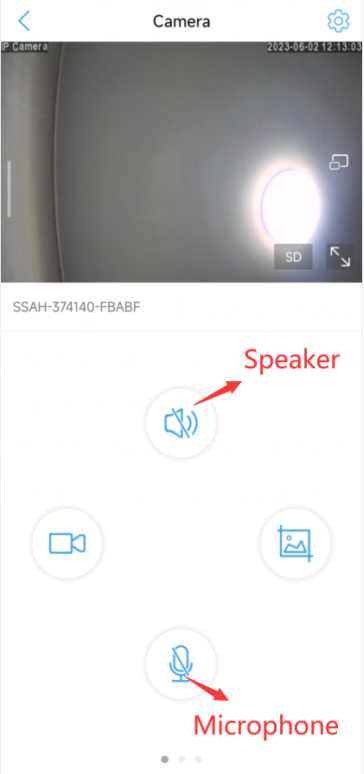
1. Activate the Speaker icon, you can hear from the camera
2. Long press to activate microphone icon to speak
Remark: You can not hear from the camera when you active the microphone, and can not speak when you hear from the camera, so you need to switch from the microphone and speaker.
0users like this.

0comments
Blog Categories
Blog Tag
- HX-2PT1
- UBox
- CamHipro
- Time Zone
- Email Alert
- SD card
- SD Card
- Share
- 4G camera
- Motion Detection
- Recording
- Delay
- Time
- Date
- Add camera
- Camhipro
- Blue Iris
- ONVIF
- adobe flash
- flash
- adobe
- chrome
- firefox
- edge
- RBX-S40
- UBOX
- Add several cameras
- Web
- Browser
- full-time recording
- 24/7
- Share the camera
- share
- Sound Alarm
- Save motion events
- Alarm Video
- Floodlight
- Forget password
- Reset
- Reset Camera
- Access Camera
- remotely
- CamHipro APP
- Add Camera
- Without a network cable
- change password
- PC software
- Password error
- 2-Way Speak
- User Manual
- Instruction
- App
- Phone App
- warranty
- 2 year warranty
- after sales service
- support
- Video
- Share Camera
- Change Time Zone
- Alarm Push
- Receive Alarm Push
- Tracking Switch
- automatically track
- Format SD Card
- push
- 4G
- confirmation
- false alarm
- sensitivity
- format
- alarm
- recording duration
- detect motion
- Can't pair
- add
- phone
- Ubox
- can't add
- battery
- Change time
- camera time is different
- time
- change camera time
- time is different
- different
- connection
- wifi
- unstable
- disconnected
- offline
- Red and blue flashing alternately
- unable to pair
- unable to connect
Archiving
RSS