Storage, Data & Troubleshooting
How to Stop False Motion Alerts on Security Cameras: 8 Fixes
Short answer: false motion alerts usually happen because the camera is watching too much of the scene, sensitivity is too high, or moving objects such as trees, cars, insects, rain, shadows, or animals keep triggering detection. Review several unwanted clips first, identify the repeated cause, and fix the scene before lowering every detection setting.
Quick Fix Table: What Is Triggering the Alert?
| False Alert Cause | What You May Notice | Best First Fix |
|---|---|---|
| Moving trees/branches | Alerts increase on windy days | Exclude vegetation from the detection area |
| Road traffic | Alerts whenever vehicles pass | Re-aim camera or change the activity zone |
| Insects/spider webs | Frequent night alerts very close to the lens | Clean the camera and remove webs |
| Rain/snow | More alerts in bad weather | Reduce sensitivity where available |
| Animals | Pets or wildlife create events | Use person filtering where supported |
| Shadows/light changes | Daytime alerts with no person present | Adjust angle or detection area |
1. Review the Recording Before Changing Settings
Look at several false-alert clips and identify what appears immediately before each event. If the same branch, road lane, animal path, or reflective surface appears repeatedly, that is more useful than guessing.
2. Re-aim the Camera Away From Busy Roads
A small angle change can remove a road, sidewalk, neighboring property, or moving vegetation from the main detection area while keeping your driveway, gate, or entrance visible.
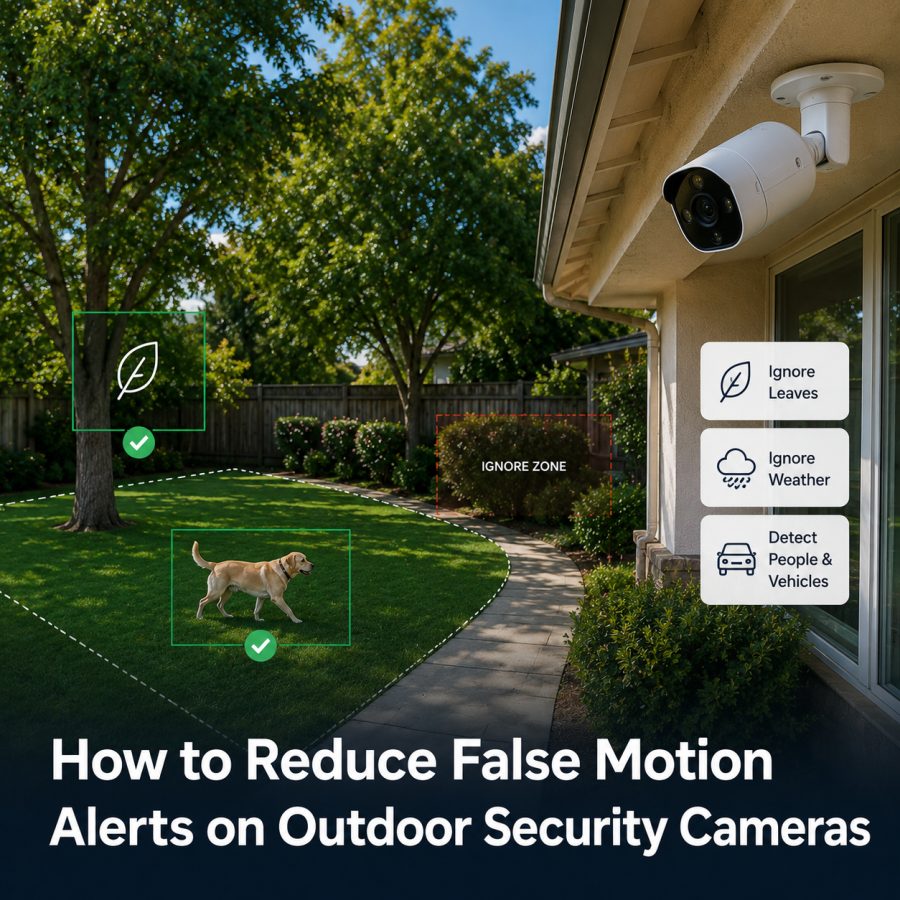
3. Use Activity Zones When Available
Focus detection on the places where people or vehicles should actually enter the property rather than monitoring the entire frame. This can be especially useful near roads, sidewalks, trees, or neighboring yards.
4. Lower Motion Sensitivity Gradually
Do not immediately move from the highest sensitivity to the lowest. Reduce the setting one level at a time, then test whether important events are still detected.
5. Use Person or AI Filtering When Supported
Some cameras can distinguish people, vehicles, pets, or other targets. These filters can reduce unnecessary alerts, but availability varies by model and service. Use the options your camera actually supports.
6. Remove Spider Webs and Clean the Lens Area
Insects and spider webs near infrared lights can appear extremely large and bright at night. Clean the lens and surrounding camera face and remove webs from the immediate mounting area.
7. Reduce Moving Vegetation in the Detection Zone
Branches, tall grass, flags, hanging decorations, and loose objects can move continuously in wind. Trim, secure, or exclude them when practical.
8. Recheck the Camera Angle at Night
Night conditions can create different triggers from daytime conditions. Headlights, reflections, rain, insects, and infrared illumination can all change what the camera sees. Review night clips before deciding the daytime placement is correct.
PIR Detection vs Camera-Based/AI Detection
Different camera models use different detection methods. PIR sensors react to changes in infrared energy, while image-based detection analyzes changes in the video image; AI filters can further classify targets on supported cameras. Because the technologies behave differently, the best fix depends on the camera model and the trigger shown in the recording.
False Alerts After Installing the Camera? Check Placement First
- Is a road or sidewalk inside the detection zone?
- Are branches close to the lens?
- Does a wall or reflective surface dominate the night view?
- Is the camera aimed at a busy animal path?
- Are headlights crossing the frame?
Placement changes can often reduce false alerts without sacrificing useful detection.
What If Alerts Are Delayed or Missing Instead?
If the problem is not false detection but connection drops or delayed notifications, use the Security Camera Connection Troubleshooting Checklist.
Need to Troubleshoot More Than Motion Alerts?
Frequently Asked Questions
Why does my security camera keep detecting motion when nobody is there?
Common triggers include trees, traffic, animals, insects, rain, reflections, shadows, or settings that are too sensitive for the scene.
Why are false alerts worse at night?
Insects, spider webs, infrared illumination, headlights, rain, and reflective surfaces can be much more visible at night.
Should I lower motion sensitivity all the way?
No. Lower it gradually so you do not accidentally reduce detection of important events.
Can activity zones reduce false alerts?
Yes, when supported. They help exclude roads, trees, or other areas that do not need monitoring.
Do AI alerts eliminate all false notifications?
No. They can reduce some unwanted events, but camera placement, lighting, network conditions, and model-specific detection still matter.
275users like this.